Compulsions
V3.1.27
Software Description
Detailed description of activities, settings, and interaction options within the scenes.
Most scenarios begin in a standing position. However, there are also chairs and sofas in many scenarios. If you want the patient to sit down, you need to provide a physical chair for them to sit on.
Lobby
This scenario starts automatically when the app is opened.
At the beginning, a 5-second countdown appears in the headset. During this time, patients should look straight ahead, as the scenario will be aligned according to this direction. Beforehand, the patient should be positioned to have as much open space in front of them as possible. This also applies to all other scenarios!
In the lobby, the aim is for patients to familiarize themselves with a virtual environment as well as with the controllers.
Patients learn two essential things here:
Moving in the Space
Patients can move through the space using their own steps. For larger distances, however, the teleport function is used. To do this, push the joystick on the controller forward with your thumb. You will then see a colored beam that allows you to aim at any point on the floor. When the beam glows green, you can teleport to that location. To do this, simply release the joystick, and you will suddenly appear at the targeted point. If the beam is not green but red, teleporting to that point is not possible.
Our recommendation: At the beginning, use the teleport function for larger distances. Let the last steps to specific objects be taken with your own steps.
Picking Up Objects
With the virtual hands, a variety of objects in the scenarios can be picked up.
To do this, move the virtual hand toward the object, such as a beer bottle.
Then,
If you want to release the object, simply let go of the button. Small objects, such as a cigarette, are automatically picked up with two fingers. Depending on the position of the hand (palm facing down or up), the cigarette is either held between the index and middle fingers or between the index finger and thumb.
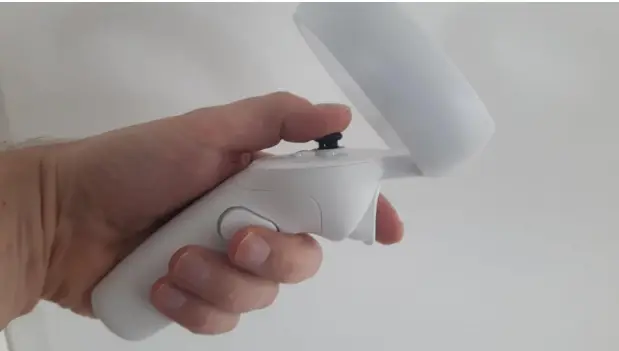
This is how to hold the controller correctly in your hand. Use your thumb to push the joystick forwards to utilise the teleport function. The button for the middle finger is used for grabbing and releasing objects.
Important note on gripping:
If you hold an object in your hand and move it into another object (e.g. the book into the table), the object disappears into it, as all objects are only virtual and there is no physical barrier. Therefore, it is important to release the objects in a timely manner.
Switching Scenarios
After an introduction in the lobby, select an appropriate scenario from the scenario overview on the left. To do this, click on the image of the scenario and then on the play button below the preview screen. The scenario will then load and appear in the headset.
Also, make sure to observe the 5-second countdown here.
Important note:
If you want to switch to another scenario, always return to the lobby first. Only then can a new scenario be selected and started.
Explanation for the following descriptions:
When referring to “buttons,” this means all the buttons found under “Presets,” “Settings,” and “Interactions” that can be pressed by you.
When additional “interaction options” are listed, these refer to actions that the patient performs themselves in the headset.
Room with bookshelves
Compulsion to order
People with a compulsion for order prefer bookshelves that are nicely sorted by colour and size. Of course, all vases and other objects must also be in their proper places. In this scenario, you are challenging your patients to allow more disorganisation and creativity.
Description of the scenario
At the beginning, your patient stands next to a table in a tasteful living room with large and full bookshelves on the walls and various decorative objects inside. Everything is very tidy and perfectly organised.
Buttons
On the buttons, the following settings can be made:
- With one click, the books can be sorted wildly out of order. The patient is now confronted with some disorder and has the task, for example, of changing this disorder only slightly.
- With one click, chaos can be created, with all the books, vases, lamps and other objects scattered around the room. The patient now has the task of reorganising the books and objects, allowing for creativity and a certain amount of disorder.
Interaction options
Additionally, there are the following interaction options:
- He/she can take books from the shelves and sort them into other shelves with books of a different colour. For example, blue books on the shelf with the red books.
- In addition, he/she can take objects such as vases and small lamps and put them in other places.
- The patient moves freely around the room or jumps to certain places using teleport points.
Room with magazines
Compulsive collection
Disposing of objects is a major challenge for people with a compulsion to collect. In this scenario, patients are introduced to waste disposal in a playful way.
Description of the scenario
Your patient is standing in a living room (identical to the one used for the order constraint) in which magazines and newspapers are piled up everywhere from the floor to waist height. In a conversation, you should now try to make the patient perceive these piles of paper as representing the collected objects in order to achieve an emotional connection.
Buttons
On the buttons, the following settings can be made:
- With one click, you can make the rubbish bin disappear so that the disposed items are no longer available.
Interaction options
Additionally, there are the following interaction options:
- She/he can pick up all the piles (newspapers or magazines). With the other hand, she/he can open a rubbish bin in the room and throw the pile into it and close the bin again.
- The patient moves through the room to the rubbish bin or jumps there using teleport points.
Train station hall
Compulsive washing
Compulsive washers suffer even with light or barely visible soiling. In this scenario, patients surrender completely to the soiling in a playful way – and then come home.
Description of the scenario
At the beginning, your patient is in a railway station concourse. The wind has knocked over all the rubbish bins and scattered the contents, which are still being blown around. Your patient now has the task of catching some of it and throwing it into the rubbish bins that they have to put up first. Their hands get dirtier and dirtier in the process. She/he can touch her/his face and arms with the virtual hands. Then she/he comes home, where unfortunately the soap has run out.
Buttons
On the buttons, the following settings can be made:
- The wind force in the station concourse can be changed
to make the situation easier or more difficult.
more difficult. - The change from the station hall to the living area
with the bathroom is done with one click
with one click.
Interaction options
Additionally, there are the following interaction options:
- She/he can place the rubbish bins in the station concourse.
- She/he can catch objects that are flying around
and throw them in the rubbish bins. - Her/his hands become visibly dirtier with every action
- In the bathroom, she/he can turn on the tap
and roughly wash off the dirt. - In the living area, she/he can pick up typical objects such as drinks.
Training
HERE, you can complete an online training that can provide additional ideas for using our VR system.
If you don’t find answers here, we are happy to assist you by phone or email!