Hilfe / Install software

Install software

Step-by-step guide for initial installation — on a supplied or personal gaming laptop.

1

Open the download link

Paste this link into the browser of your gaming laptop and open this page:

https://www.vr-coach.at/download/

Click on the purchased software package and run the installation .

Two security warnings may appear. Click on “Keep” and “Run anyway“. The “Keep” option is a bit hidden. See in this screenshot where to find it:

2

Log in

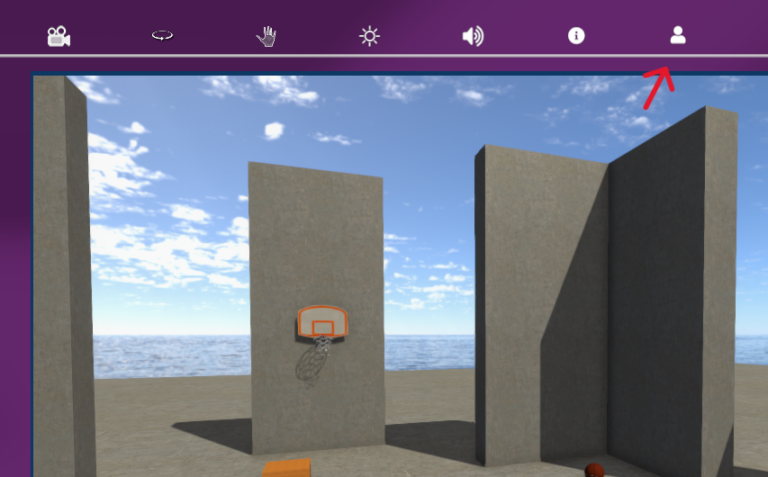
After the installation is complete, the software will open on your desktop. Log in to your user account now with the login data provided by VR Coach GmbH.
3

Download scenarios

After logging in, the download of all scenarios and films starts.

Please wait for the download to complete fully before closing the software.

4

If you did not purchase the gaming laptop from VR Coach, first install:

Register with Steam and then also install SteamVR.

Each headset has its own app that must be installed on your computer to enable the connection between the computer and the headset. For the Pico 4 Ultra, for example, this is the Pico Connect app.

Connect device & start software

Select your device for the guide on connecting it to the laptop:

If you don’t find answers here, we are happy to assist you by phone or email!

You can find screenshots of our VR software on our website. These screenshots and video clips do not come close to the experience of using a VR headset.

Our users consistently confirm the very high quality and realism of the 3D graphics. Unfortunately, this quality cannot be fully conveyed through simple images on the website.

The screenshots shown are intended only to illustrate and demonstrate the content.

Therapeutin am Schreibtisch mit Laptop, VR Coach smartsystem VR Therapie
Subscribe to the mailing list
You can find screenshots of our VR software on our website. These screenshots and video clips do not come close to the experience of using a VR headset.

Our users consistently confirm the very high quality and realism of the 3D graphics. Unfortunately, this quality cannot be fully conveyed through simple images on the website.

The screenshots shown are intended only to illustrate and demonstrate the content.

Therapeutin am Schreibtisch mit Laptop, VR Coach smartsystem VR Therapie
Subscribe to the mailing list
Stehende Frau mit Katalog in der Hand, VR Coach smartsystem VR Therapie
Haven't found what you were looking for yet?
Order our catalog with price list free of charge and without obligation.
Vielen Dank für Ihre Anmeldung!

Wir nehmen demnächst mit Ihnen Kontakt auf.

Ihr VR Coach-Team

VR Coach® smart system

Thank you for your inquiry!

We will be happy to get in touch with you soon!

Your VR Coach team

Would you also like to test our content for depressions, eating disorders and compulsions free of charge?